
LogoShipdirs
  • Discover
  • Search
  • Categories
  • Pricing
  • Blog
  • Submit
LogoShipdirs

Newsletter

Join the Community

Subscribe to our newsletter for the latest news and updates

  1. Home
  2. Category
  3. Scientific Figure
Scientific Figure logo

Scientific Figure

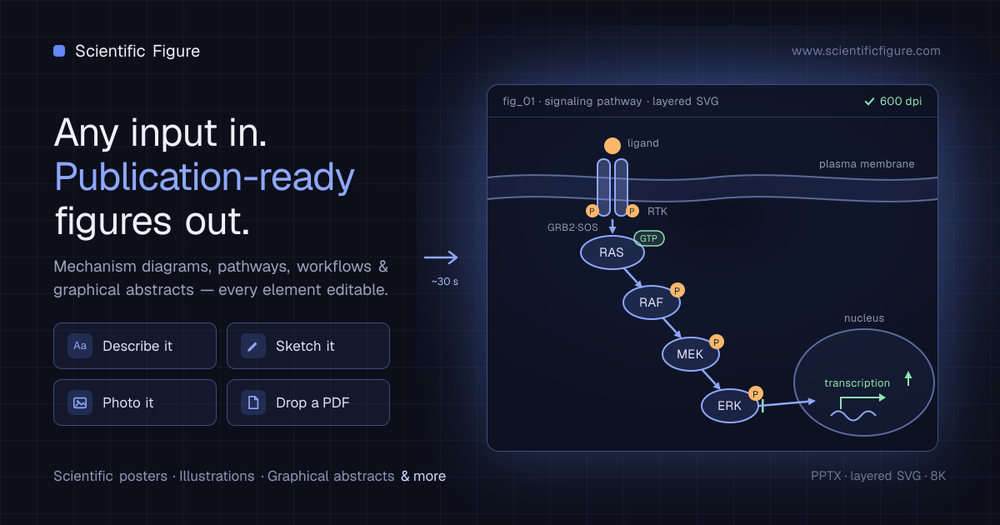
An AI workspace for creating editable scientific figures, graphical abstracts, diagrams, illustrations, and posters from research inputs.

Visit Website
Scientific Figure product preview
Visit Website

Introduction

Back

Information

  • Publisher
    pushtimepushtime
  • Websitescientificfigure.com
  • Published date2026/09/10

Categories

  • Research & Analysis
  • Education & Learning
  • Design & Creative

Tags

  • AI Powered
  • Scientific Figures
  • Scientific Illustration
  • Diagram Generation
  • Academic Writing
  • Poster Design
  • Editable Graphics
icon of DDSM批量二维码生成器

DDSM批量二维码生成器

AD

专业的DDSM批量二维码生成工具,在线快速生成多个高质量二维码,支持自定义样式、格式导出与打包下载。

How to Use Scientific Figure

Scientific Figure's Core Features

Research-input generation

Creates figures from prompts, sketches, images, abstracts, and PDF papers.

Editable canvas

Allows labels, arrows, shapes, colors, and backgrounds to be changed after generation.

Graphical abstracts

Builds visual summaries suitable for papers, posters, and presentations.

Scientific diagram types

Supports mechanism, pathway, circuit, cell, PRISMA, and phylogenetic diagrams.

Poster creation

Turns research material into editable conference and presentation posters.

Experimental templates

Includes box plots, 96-well plates, and other research-oriented templates.

Journal styling

Offers illustration styles and color palettes for scientific communication.

Flexible exports

Exports raster, layered vector, and editable PowerPoint formats.

Scientific Figure's Use Cases

1

Research papers

Create mechanisms, signaling pathways, workflows, and graphical abstracts.

2

Conference posters

Convert an abstract or paper into an editable poster layout.

3

Clinical communication

Produce clear visual abstracts and explanatory scientific illustrations.

4

Teaching materials

Build labeled cell, respiration, circuit, and other educational diagrams.

5

Lab presentations

Prepare exact plots, plate layouts, and experiment visuals for slides.

FAQ from Scientific Figure

Scientific Figure Support & Company Information

Support Email
support@scientificfigure.com

More Products

RemoveText.video logo

RemoveText.video

Video & MediaDesign & Creative

AI video cleanup tool for removing text, hardcoded subtitles, captions, logos, and authorized watermarks while preserving the original framing.

Video EditorWatermark RemovalImage EditingAI Powered
Vizbl logo

Vizbl Photo to 3D

3D DesignDesign & CreativeBusiness & Commerce

Turn one to six product photos into a hosted 3D model with a viewer, AR try-on, embed code, link, QR code, and GLB or USDZ downloads.

Image to 3D3D Modeling3D File ConversionEcommerceEcommerce Operations+3
YoFont official favicon

YoFont

Design & Creative

Generate editable, installable fonts from prompts, lettering, or handwriting, and identify fonts from images.

Font GenerationTypographyFont IdentificationMultilingualCreator Tools

Scientific Figure turns research inputs into publication-ready visual material. Users can start with a text prompt, hand sketch, abstract, image, or PDF paper and generate a scientific figure that remains editable in a canvas.

The platform supports graphical abstracts, mechanism diagrams, experimental workflows, posters, box plots, circuit diagrams, PRISMA flows, phylogenetic trees, cell diagrams, and 96-well plate templates. Researchers can refine labels, arrows, shapes, colors, and backgrounds before exporting PNG, JPG, layered SVG, or editable PPTX files.

  1. Provide a text description, sketch, image, abstract, or PDF paper.
  2. Choose the figure, diagram, poster, or template type that matches the research task.
  3. Let the AI create a first draft, then edit labels, arrows, shapes, colors, and backgrounds on the canvas.
  4. Apply an illustration style or journal color palette when needed.
  5. Export the finished work as PNG, JPG, layered SVG, or editable PPTX.
LogoShipdirs

A curated directory of tools that help you build, create, and grow.

Explore
  • Discover
  • Search
  • Categories
Resources
  • Blog
  • Pricing
  • Submit
More
  • Sitemap
  • Contact
Company
  • About Us
  • Privacy Policy
  • Terms of Service

Featured on

Listed on Turbo0Featured on Wired BusinessFeatured on Twelve ToolsFeatured on Dofollow.ToolsFazier badgeaitoolexListed on Backlink DirsLaunching Soon on UneedListed on AIDirsFeatured on FWFWFeatured on NewTool.siteAidirsFeatured on BestskyToolsListed on JustSimple ToolsFeatured on AIJustBetter.comFeature On aifinderplus.comFeatured on AITrustListFeatured on aihuntlist.comFeatured on ToolListed
Copyright © 2026 All Rights Reserved.