
LogoShipdirs
  • Discover
  • Search
  • Categories
  • Pricing
  • Blog
  • Submit
LogoShipdirs

Newsletter

Join the Community

Subscribe to our newsletter for the latest news and updates

  1. Home
  2. Category
  3. EasyClaw
easyclaw icon

EasyClaw

A native OpenClaw desktop and cloud workspace for multi-model AI agents, automation, browser tasks, and scheduled work.

Visit Website
easyclaw image
Visit Website

Introduction

Back

Information

  • Publisher
    pushtimepushtime
  • Websiteeasyclaw.com
  • Published date2026/09/12

Categories

  • AI & Automation
  • Developer Tools
  • Productivity & Collaboration

Tags

  • AI Powered
  • AI Agents
  • AI Assistant
  • Desktop App
  • Automation
  • Browser Automation
  • Workflow Automation
icon of DDSM批量二维码生成器

DDSM批量二维码生成器

AD

专业的DDSM批量二维码生成工具,在线快速生成多个高质量二维码,支持自定义样式、格式导出与打包下载。

How to Use EasyClaw

EasyClaw's Core Features

Native desktop app

Use a guided Windows or macOS application instead of assembling the agent environment manually.

Multi-model support

Route work across supported mainstream models and compatible local-model setups.

Automation and browser tasks

Run data collection, analysis, browser, file, and terminal workflows with configurable controls.

Messaging integrations

Operate agents from channels such as Telegram, Discord, Slack, WhatsApp, and other supported apps.

Specialist agents

Start with expert agents for common workflows or build a custom agent around your own skills.

EasyClaw's Use Cases

1

Ecommerce operations

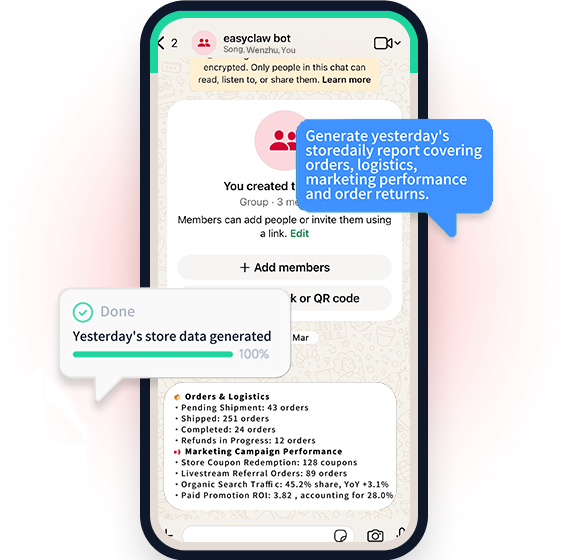
Aggregate store signals, surface inventory or review issues, and prepare recurring reports.

2

Content production

Draft, analyze, and schedule recurring content workflows from a desktop or connected chat channel.

3

Research and reporting

Collect information, summarize it, and deliver briefings on a schedule.

4

Desktop agent experimentation

Try OpenClaw-style agent workflows with a graphical setup before adopting a deeper developer setup.

FAQ from EasyClaw

EasyClaw Support & Company Information

Company
EasyClaw
Contact
Open Contact

Social Links

  • X
  • YouTube
  • TikTok

More Products

icon of Intertakt

Intertakt

Productivity & Collaboration

The gym round clock, made personal: voice and beep cues call every HIIT, Tabata and EMOM round over your playlist, screen off, and an interrupted session resumes to the exact second. No ads, no account.

Mobile App
Trystique logo

Trystique

AI & Automation

Interactive AI stories with character-consistent images and scenes that change as you play.

AI PoweredCharacter ConsistencyStoryboardingCreator Tools
DogeSMS logo

DogeSMS

Developer ToolsBusiness & Commerce

Disposable phone numbers for OTP verification, long-term rentals, and SMS automation across 180+ countries and thousands of services.

APISMS VerificationVirtual Phone NumberAutomation

EasyClaw

EasyClaw is a native OpenClaw application for Windows and macOS, with a cloud edition for always-on workflows. It packages AI-agent setup, model routing, skills, chat-channel integrations, and automation into a guided desktop experience.

Core capabilities
  • Install a native Windows or macOS application with a guided setup and no terminal-first configuration.
  • Connect mainstream hosted models and supported local models through one agent workspace.
  • Run file, terminal, browser, and data-collection tasks with configurable controls.
  • Connect messaging channels such as Telegram, Discord, Slack, WhatsApp, and other listed integrations.
  • Build or select specialist agents for ecommerce, finance, content, reporting, and analysis workflows.
  • Schedule recurring reports and tasks, then receive results through connected channels.

EasyClaw is aimed at people who want a graphical on-ramp to OpenClaw-style agents while retaining deeper configuration options. Review its permissions, model routing, and cloud data-handling terms before enabling computer control or business automation.


  1. Download the Windows or macOS application, or choose the cloud edition.
  2. Complete the guided setup and choose the model providers you want to use.
  3. Select a specialist agent or create one with the skills and instructions your workflow needs.
  4. Connect only the chat channels, files, and services required for the task.
  5. Test actions in a low-risk workspace before enabling scheduled or computer-control workflows.
LogoShipdirs

A curated directory of tools that help you build, create, and grow.

Explore
  • Discover
  • Search
  • Categories
Resources
  • Blog
  • Pricing
  • Submit
More
  • Sitemap
  • Contact
Company
  • About Us
  • Privacy Policy
  • Terms of Service

Featured on

Listed on Turbo0Featured on Wired BusinessFeatured on Twelve ToolsFeatured on Dofollow.ToolsFazier badgeaitoolexListed on Backlink DirsLaunching Soon on UneedListed on AIDirsFeatured on FWFWFeatured on NewTool.siteAidirsFeatured on BestskyToolsListed on JustSimple ToolsFeatured on AIJustBetter.comFeature On aifinderplus.comFeatured on AITrustListFeatured on aihuntlist.comFeatured on ToolListed
Copyright © 2026 All Rights Reserved.